Exporting vCards from your Usherpa account to Outlook
Carolyn Venard
Updated
Log into your Usherpa account using your user name and password.
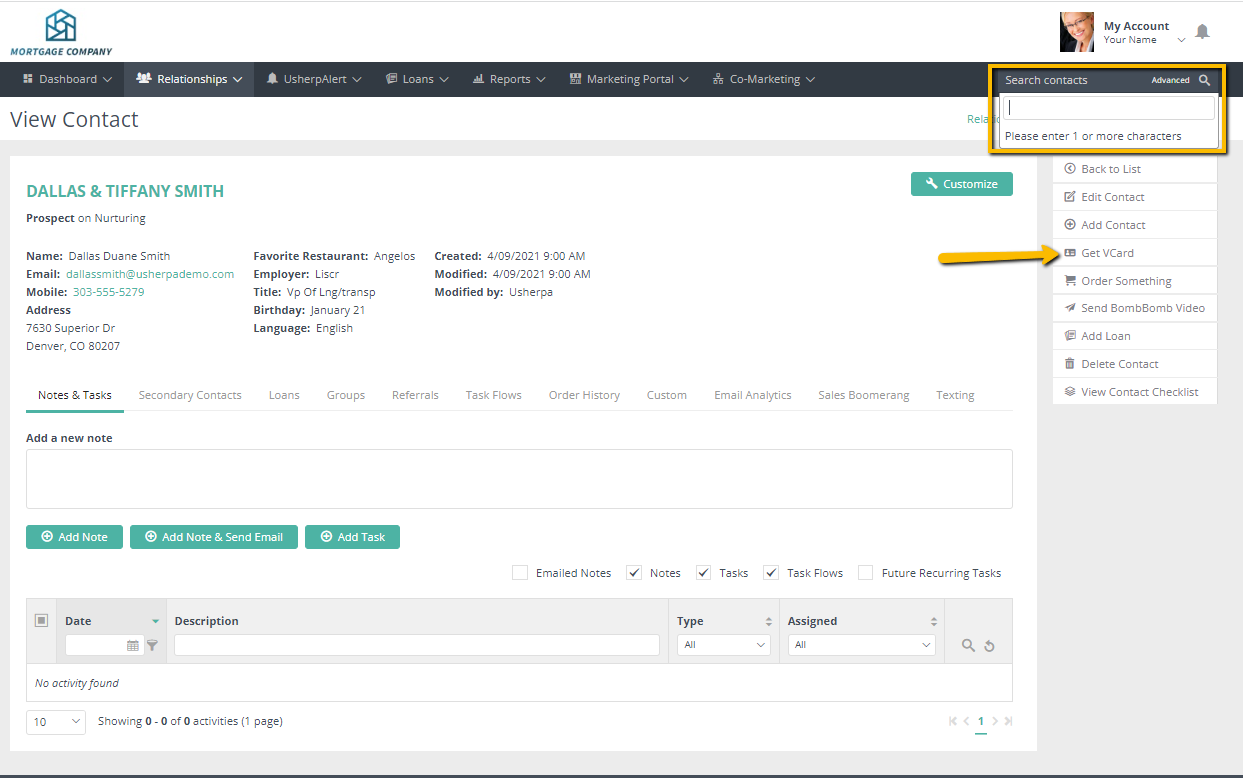
Click on Search contacts in the upper right corner.
Type in the name, first or last name. Click on the name.
When the contact information pulls up, hit Get VCard on the right side of the screen and click on it.
Save your vCard (.vcf) to your desktop or somewhere on your computer. Go to Outlook Click on the “file” pull down menu and go to “Open and Export” then "Import/Export" Select “Import a VCard file (.vcf) and hit “Next.” Navigate to the vCard that you saved to your computer and click “Open.” Use the “Go” pull down menu in your Outlook and click on “Contacts.” You will see that your contact has been added to your Outlook.

Comments
0 comments
Please sign in to leave a comment.